

Description
Turn an empty WordPress install into a complete brewery, winery, or distillery website with one prompt. Choose a theme (for example, the Neve FSE Theme works nicely) and add the Easy MCP AI plugin on a fresh WordPress install to get started. Connect your favorite AI Model – including Claude, Cursor, ChatGPT, and others – and paste this prompt text into a normal chat window. Your AI Model will walk you through a hands-free setup of your WordPress site, planning and building the pages based on best practices identified by Market Your Craft and personalizing using your brand assets. Structured data and llms.txt files will help search engine and AI assistants find you, and placeholder copy and images can be easily updated.
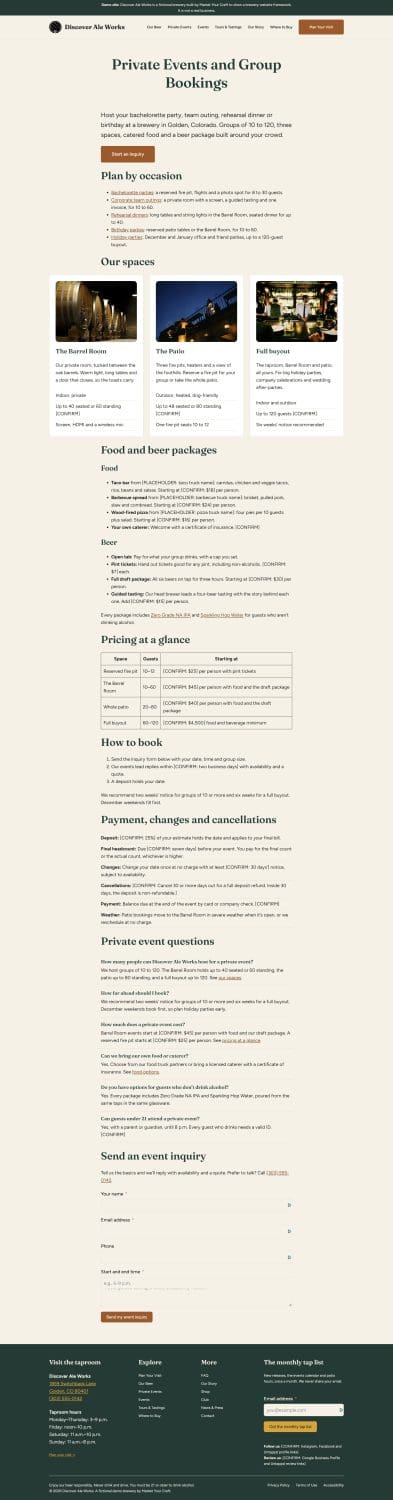
See it in action: Discover Ale Works, a demo brewery in Golden, CO, was built entirely from this prompt.
How to use this prompt
This prompt turns a blank WordPress install into a complete, AI-discoverable craft beverage website in one guided session with your favorite AI Model. It is written for the owner or manager of a brewery, winery, distillery, cidery, meadery or non-alcoholic brand who wants to see what a best-practice site looks like before investing in final copy and photography.
Your AI Model builds every page with realistic placeholder copy written in your brand’s voice. Anything it cannot verify is marked in brackets, like [CONFIRM: dog policy], so nothing invented ever goes live by accident.
Before you start, have these in place:
- A fresh WordPress install with SSL active (the padlock in your browser bar)
- The Neve FSE theme installed and active
- The Easy MCP AI plugin installed and connected to your AI Model through an Administrator account
- These Easy MCP AI tools switched on (wp-admin → Easy MCP AI → Tools): wp_update_global_styles, wp_update_template, blocks_site_styles, wp_update_custom_css, wp_install_plugin, wp_activate_plugin
- Your inputs gathered (next section) and uploaded to the chat or shared as links
How the session runs:
- Paste the prompt from the section below into a new chat with the connector active.
- Your AI Model reviews your inputs, asks only for what’s missing, then proposes a sitemap and design direction.
- You approve the structure. Nothing is built until you do.
- Your AI Model builds the site as drafts, page by page, then walks you through a review.
- You replace placeholders with confirmed facts and publish.
What to gather first
The more of these you provide, the less placeholder copy you’ll have to replace later. Only the Minimum items are needed to start; your AI Model writes realistic placeholders for everything else and flags each one.
Priority key: Minimum = needed to start · Recommended = makes the site specific to you · Optional = adds depth.
1. Brand foundation
Every page is written from this. A clear brand story is the first thing AI looks for.
| Input | What to include | Priority |
| Brand basics | Name, producer type (brewery, winery, distillery, cidery, meadery, NA), product categories, year founded, city and state | Minimum |
| Origin story | Go beyond “I started in my basement”: what were you feeling, and why did you do it? A few paragraphs or a voice memo transcript | Recommended |
| Mission or brand story | One to three sentences: why you’re in business and why drinkers should care | Recommended |
| Voice | Three to five words that describe how you sound, two or three samples of copy you like (labels, menus, posts), and words you never use | Recommended |
| People | Founder and key team names, roles, short bios, and which people should be visible on the site | Recommended |
| Credentials | Awards, competition medals, press coverage, certifications. Links or scans only; nothing unverified will be published | Optional |
2. Style guide
Your AI Model sets the theme’s colors, fonts and spacing from these.
| Input | What to include | Priority |
| Logo files | SVG preferred, plus PNG. Horizontal and stacked versions, and light and dark versions if you have them | Minimum |
| Site icon | Square mark, at least 512 × 512 px | Recommended |
| Colors | Hex codes for primary, secondary and accent colors, with any usage rules | Minimum |
| Fonts | Font names for headings and body text, and whether they’re licensed for web use. Google Fonts are easiest | Recommended |
| Brand guidelines | Your style guide PDF, if one exists | Optional |
| References | Two or three websites you admire, and one you don’t, with a line on why | Optional |
3. Photos and video
Photos help drinkers picture themselves in your space before they visit. Their descriptions (alt text) tell AI what your space offers.
| Input | What to include | Priority |
| Lifestyle photos | Guests enjoying your space, used with their permission. At least three | Recommended |
| Space photos | One or more of each area: tasting room, patio, barrel room, production floor, event space, exterior | Recommended |
| Product photos | Staged shots on a white background, plus pouring or in-hand shots | Recommended |
| Team photos | Founder and staff, in action and as portraits | Optional |
| Event photos | Past events and private parties in the spaces you rent | Optional |
| Hero video | A 15 to 30 second clip of the space in use | Optional |
| Photo notes | One line per photo on what it shows (“guests on the heated patio at sunset”) and confirmation you own the rights | Recommended |
For full-width banners, send landscape images at least 2,000 px wide. Your AI Model will compress and rename everything before upload.
4. Visit details
These facts answer the questions guests ask before they visit, and they must match your Google Business Profile exactly.
| Input | What to include | Priority |
| Location and contact | Street address, phone, public email, map link | Minimum |
| Hours | Regular hours, seasonal changes, holiday closures | Minimum |
| Guest policies | Minimum age and minors policy, dogs, outside food, reservations, parking, wheelchair access | Recommended |
| Food | Your own menu, food truck partners (named), catering rules | Recommended |
| Profile links | Google Business Profile URL and social media handles | Recommended |
5. Spaces and occasions
AI matches drinkers to destinations by occasion language (“bachelorette party,” “team outing”), not by product specs.
| Input | What to include | Priority |
| Spaces | Each area guests can use or book: name, capacity, seated or standing, indoor or outdoor | Recommended |
| Occasions | The occasions you serve: date nights, birthdays, bachelorettes, corporate outings, private buyouts, members’ events, destination visits | Recommended |
| Packages and pricing | Beverage packages, food options, and pricing signals such as “starting at $25 per person” or “buyouts from $500” | Recommended |
| Booking | How to book, lead time, deposit and cancellation policy | Recommended |
6. Products
One-line chalkboard listings miss the story. Each product page should give drinkers enough to choose.
| Input | What to include | Priority |
| Core lineup | For each product: name, style or varietal, ABV, tasting notes, the story behind it, formats and sizes, price, where it’s available | Recommended |
| Seasonal and limited | Release timing and how fans hear about them | Optional |
| Non-alcoholic options | Any NA products, described with the same flavor detail as the rest | Recommended if offered |
| Ratings | Links to your Untappd, Vivino, CellarTracker or Distiller.com product pages | Optional |
7. Events
Fully documented event listings are among the most citable content a producer can publish.
| Input | What to include | Priority |
| Recurring series | Trivia, music nights, release parties: schedule, format and who it’s for | Recommended |
| Upcoming events | Two or three events with date and time, format, named beverages, named food, setting, ideal guest, and logistics (capacity, price, link, age rules, dogs) | Recommended |
| Ticketing | Where tickets are sold (Eventbrite, Tock, your POS) | Optional |
8. Questions guests ask
Ask the people who answer your phone and work your bar: “What do guests ask most often before they visit?”
| Input | What to include | Priority |
| Top questions | 10 to 20 real questions with your answers, covering visit planning, groups and private events, products and availability, food, and clubs or memberships | Recommended |
9. Sales and distribution
| Input | What to include | Priority |
| Retail accounts | Retail and restaurant accounts with full addresses, or your locator tool (Stockist, Storepoint, WP Store Locator or similar) | Recommended if distributed |
| Online sales | Platform (WooCommerce, Ecwid, Shopify, a winery or POS system), states you ship to, pickup options | Optional |
| Club or membership | Tiers, price, benefits, cancellation terms | Optional |
10. Email, reviews and compliance
| Input | What to include | Priority |
| Email service | Provider name and signup form embed code (Mailchimp, Klaviyo or similar), what subscribers get, and how often | Recommended |
| Review links | Direct review links for Google and your category’s platforms (Untappd, Vivino, CellarTracker, Distiller.com, TripAdvisor) | Recommended |
| Press | Links to published coverage and any press releases | Optional |
| Legal pages | Your privacy policy and terms, or approval for your AI Model to draft placeholders for your attorney to review | Recommended |
| Age gate | Whether you want one. It’s self-regulated but recommended by guilds and industry groups, especially for spirits | Recommended |
| Responsibility message | A short responsible-drinking line for the footer | Optional |
The prompt
Copy everything in the text file into a new chat. Fill in the About my brand section at the top, attach your inputs, and send. Delete any site feature that doesn’t apply to you.
After the build
Your AI Model’s build report includes a placeholder inventory. Working through it is what turns a demo into a launch-ready site.
Before you publish:
- Replace every [CONFIRM] with a verified fact: hours, prices, policies, capacities
- Rewrite or approve every [PLACEHOLDER] so it sounds like you
- Fill every [PHOTO] slot with your own images, or remove the slot
- Have your attorney review the privacy policy, terms, shipping language and age gate
- Check that your address, phone and hours match your Google Business Profile exactly
- Approve each page, then ask your AI Model to publish
In the first 30 days:
- Claim and update your Google Business Profile and your category’s review platforms (Untappd, Vivino, CellarTracker, Distiller.com, TripAdvisor)
- Put a QR code linking to your Google review page at the bar or register
- List your next events on Eventbrite, Untappd Events or your local tourism calendar
- Send a press release about the new site or your next notable event, then post it to your News page
Ongoing:
- Add every event with the full seven-point listing
- Update the FAQ whenever staff hear a new question more than twice
- Regenerate your llms.txt file two to four times a year, or after any major site change
- Each quarter, ask ChatGPT, Claude and Gemini the questions your guests would ask (“best brewery for a bachelorette party in [city]”) and note whether you appear. Market Your Craft’s Summer of AI: Monitor Your Visibility walks through how